
Invisible Text Generator
Generate invisible text or blank characters to use in TikTok comments, WhatsApp messages, Instagram bios, or gaming usernames. Copy & paste empty text easily.
Invisible Text Character Generator
Generate blank characters for WhatsApp & Gaming
Type text below to generate an invisible string of the same length.

What is an Invisible Character
An invisible text generator is a tool that helps you easily get attention on social media. It’s very popular nowadays on many platforms, especially Instagram, TikTok, and WhatsApp. You can prank your friends by sending empty text messages to confuse them. People take your messages seriously even when they’re empty text.
You cannot use Zero width space text for usernames, but you can use it for display names. You can also use it in PUBG to confuse other players. There are many methods you can use to prank people with invisible text try small text generator.
Types of Unicode & Invisible Empty Characters
If you’re using HTML format, remove the semicolon (;) and it will work.
| Unicode | Description | HTML Entity | Example |
|---|---|---|---|
| U+0020 | Space |   | [ ] |
| U+00A0 | No-Break Space | | [ ] |
| U+2000 | En Quad |   | [ ] |
| U+2001 | Em Quad |   | [ ] |
| U+2002 | En Space |   | [ ] |
| U+2003 | Em Space |   | [ ] |
| U+2004 | Three-Per-Em Space |   | [ ] |
| U+2005 | Four-Per-Em Space |   | [ ] |
| U+2006 | Six-Per-Em Space |   | [ ] |
| U+2007 | Figure Space |   | [ ] |
| U+2008 | Punctuation Space |   | [ ] |
| U+2009 | Thin Space |   | [ ] |
| U+200A | Hair Space |   | [ ] |
| U+2028 | Line Separator | 
 | [ ] |
| U+205F | Medium Mathematical Space |   | [ ] |
| U+3000 | Ideographic Space |   | [ ] |
| U+2003 | Em Space |   | [ ] |
| U+25A0 | Black Square | ■ | [■] |
| U+0009 | Horizontal Tab | 	 | [ ] |
| U+000A | Line Feed | | [ ] |
| U+000C | Form Feed |  | [ ] |
| U+001C | File Separator |  | [ ] |
| U+200B | Zero-Width Space | ​ | [] |
| U+200C | Zero-Width Non-Joiner | ‌ | [] |
| U+2060 | Word Joiner | ⁠ | [] |
| U+2061 | Word Separator | ⁡ | [] |
| U+2062 | Paragraph Separator | ⁢ | [] |
| U+00AD | Soft Hyphen | ­ | [] |
| U+034F | Combining Grapheme Joiner | ͏ | [] |
| U+061C | Arabic Letter Mark | ؜ | [] |
| U+115F | Hangul Choseong Filler | ᅟ | [ᅟ ] |
| U+1160 | Hangul Jungseong Filler | ᅠ | [ᅠ ] |
| U+17B4 | Khmer Vowel Inherent Aq | ឴ | [឴ ] |
| U+17B5 | Khmer Vowel Inherent Aa | ឵ | [឵ ] |
| U+180B | FVS1 | ᠋ | [᠋ ] |
| U+180C | FVS2 | ᠌ | [᠌ ] |
| U+180D | FVS3 | ᠍ | [᠍ ] |
| U+180E | MVS | ᠎ | [ ] |
| U+200D | Zero Width Joiner | ‍ | [ ] |
| U+200E | Left-to-Right Mark | ‎ | [ ] |
| U+200F | Right-to-Left Mark | ‏ | [ ] |
| U+202A | Left-to-Right Embedding | ‪ | [ ] |
| U+202B | RLE | ‫ | [ ] |
| U+202C | Pop Directional Formatting | ‬ | [ ] |
| U+202D | Left-to-Right Override | ‭ | [ ] |
| U+202E | Right-to-Left Override | ‮ | [ ] |
| U+202F | Narrow No-Break Space |   | [ ] |
| U+2063 | Invisible Separator | ⁣ | [ ] |
| U+2064 | Invisible Plus | ⁤ | [ ] |
| U+2066 | LRI | ⁦ | [ ] |
| U+2067 | RLI | ⁦ | [ ] |
| U+2068 | FSI | ⁨ | [ ] |
| U+2069 | Pop Directional Isolate | ⁩ | [ ] |
| U+206A | Inhibit Symmetric Swapping |  | [ ] |
| U+2800 | Braille Pattern Blank | ⠀ | [⠀ ] |
| U+206B | Activate Symmetric Swapping |  | [ ] |
| U+206C | Inhibit Arabic Form Shaping |  | [ ] |
| U+206D | Activate Arabic Form Shaping |  | [ ] |
| U+206E | National Digit Shapes |  | [ ] |
| U+206F | Nominal Digit Shapes |  | [ ] |
| U+3164 | Hangul Filler | ㅤ | [ㅤ ] |
| U+FE00 | Variation Selector-1 | ︀ | [︀ ] |
| U+FE01 | Variation Selector-2 | ︁ | [︁ ] |
| U+FE02 | Variation Selector-3 | ︂ | [︂ ] |
| U+FE03 | Variation Selector-4 | ︃ | [︃ ] |
| U+FE04 | Variation Selector-5 | ︄ | [︄ ] |
| U+FE05 | Variation Selector-6 | ︅ | [︅ ] |
| U+FE06 | Variation Selector-7 | ︆ | [︆ ] |
| U+FE07 | Variation Selector-8 | ︇ | [︇ ] |
| U+FE08 | Variation Selector-9 | ︈ | [︈ ] |
| U+FE09 | Variation Selector-10 | ︉ | [︉ ] |
| U+FE0A | Variation Selector-11 | ︊ | [︊ ] |
| U+FE0B | Variation Selector-12 | ︋ | [︋ ] |
| U+FE0C | Variation Selector-13 | ︌ | [︌ ] |
| U+FE0D | Variation Selector-14 | ︍ | [︍ ] |
| U+FE0E | Variation Selector-15 | ︎ | [︎ ] |
| U+FE0F | Variation Selector-16 | ️ | [️ ] |
| U+FEFF | Zero Width No-Break Space |  | [ ] |
| U+FFA0 | Halfwidth Hangul Filler | ﻀ | [ﻀ ] |
| U+FFFC | Object Replacement Character |  | [ ] |
| U+133FC | EGYPTIAN HIEROGLYPH Z015B | 𓮼 | [ ] |
| U+1D159 | Musical Symbol Null Notehead | 𝄙 | [𝄙 ] |
| U+1D173 | Musical Symbol Begin Beam | 𝆓 | [𝆓 ] |
| U+1D174 | Musical Symbol End Beam | 𝆔 | [𝆔 ] |
| U+1D175 | Musical Symbol Begin Tie | 𝆕 | [𝆕 ] |
| U+1D176 | Musical Symbol End tie | 𝆖 | [𝆖 ] |
| U+1D177 | Musical Symbol Begin Slur | 𝆗 | [𝆗 ] |
| U+1D178 | Musical Symbol End Slur | 𝆘 | [𝆘 ] |
| U+1D179 | Musical Symbol Begin Phrase | 𝆙 | [𝆙 ] |
| U+1D17A | Musical Symbol End Phrase | 𝆚 | [𝆚 ] |
| U+E0001 | Language Tag | 󠀁 | [ ] |
| U+E0020 | Tag Space | 󠀢 | [ ] |
| U+E0021 | TAG EXCLAMATION MARK | 󠀣 | [ ] |
| U+E0022 | TAG QUOTATION MARK | 󠀤 | [ ] |
| U+E0023 | TAG NUMBER SIGN | 󠀥 | [ ] |
| U+E0024 | TAG DOLLAR SIGN | 󠀦 | [ ] |
| U+E0025 | TAG PERCENT SIGN | 󠀧 | [ ] |
| U+E0026 | Tag Ampersand | 󠀨 | [ ] |
| U+E0027 | TAG APOSTROPHE | 󠀩 | [ ] |
| U+E0028 | TAG LEFT PARENTHESIS | 󠀪 | [ ] |
| U+E0029 | TAG RIGHT PARENTHESIS | 󠀫 | [ ] |
| U+E002A | TAG ASTERISK | 󠀬 | [ ] |
| U+E002B | TAG PLUS SIGN | 󠀭 | [ ] |
| U+E002C | TAG COMMA | 󠀮 | [ ] |
| U+E002D | TAG HYPHEN-MINUS | 󠀯 | [ ] |
| U+E002E | Tag Full Stop | 󠀰 | [ ] |
| U+E002F | Tag Solidus | 󠀱 | [ ] |
| U+E0030 | TAG DIGIT ZERO | 󠀲 | [ ] |
Empty Text Generator Features
An empty text generator includes many features that you can easily use on social media. It’s easy to use – just copy however many characters you want in empty format. For example, if you want 10 empty characters, you can generate them.
Easy To Use
You can easily use Non-visible characters just copy it from here and paste it on WhatsApp or any social media platform you like.
User Friendly
It’s user-friendly you can easily find everything without any complicated options. Just copy and use.
Free to Use
Most websites require a monthly subscription just to let you copy Hidden characters.
Unlimited Numbers
Generate unlimited invisible text characters instantly without any subscription or login.
Multiple Languages
No need to worry about language compatibility it supports all regions, and you can copy and paste any language with ease.
Testing Available
You can easily test it here by copying the empty character to make sure it’s working.
How to Use Invisible Characters?
The invisible character is one of the most underrated tools today because most people don’t know how to use it. You can surprise others with creative ideas, like send blank message WhatsApp the next person will be shocked, wondering what you’re trying to say.
You need to follow these methods to use the generated invisible text. It’s also very easy to use.

1. Copy Empty Characters with a Button
Many users struggle to find the exact button for generating invisible text instantly. Just click the button below to copy the invisible character and paste it wherever you like. If you want a longer invisible text, you can also use the option at the top.
Copy 2000 invisible characters for Instagram comments
Copy 7 invisible characters for quick use
2. Copy Blank Space Manually
If you want to copy it manually for coding, building apps, or websites whether for development purposes or to insert it into your code — we provide both manual copy options and the full HTML code.
Manually Copy Selection = [ ⠀⠀⠀⠀⠀⠀⠀]
- Displays 7 invisible characters (
U+2800= Braille Pattern Blank). - Shows the HTML entity code so developers can use it in their code easily:
⠀is the HTML entity forU+2800.
Unlimited Invisible Letters Tool Online
You can generate unlimited invisible characters using this tool. Even if you want 1000 characters limit, you can generate them easily just make sure to use them responsibly.
Generate Empty Character Instantly
First, generate the invisible characters using the button for example, if you need 10 characters, generate them accordingly.

Copy and Paste the Character
After copying the empty character, make sure to double-check if it’s working on your device. You can test it here if you want to verify.
Test and Adjust Before Use
You can test it here if you have any doubts. If the tool isn’t working, just paste it here to check before using it on social media platforms like WhatsApp, Instagram comments, or your Facebook profile name.
Blank Bulk Text Generator
If you want to prank someone or use it for any other purpose and are looking for a blank text generator, this tool can generate up to 1,000 characters at once. If you need more, use the button below to generate up to 2,000 characters, it will help you save time.
Perfect for WhatsApp spacing and formatting
Where to Use Invisible Characters?
People use invisible characters on social media like WhatsApp, Facebook, TikTok, Instagram, and Discord, especially in comment sections. It helps you grab attention and can even boost your profile and increase your followers.
Invisible characters are popular and very useful because most people don’t know about them. This tool is great for avoiding some problems and can be used to surprise or confuse others in a fun way.
When someone sees your trick, they might try to copy it using the space bar, but it won’t work. That’s because the empty character is a special Unicode Braille Pattern Blank. It is not available on smartphones and can only be found on invisible character websites.
1. Invisible Text on Whatsapp and Massenger
This is most commonly used on messaging platforms like WhatsApp and Messenger. People use it for fun with family and friends. If your conversations feel boring, you can add a twist by using this to make things more exciting when you paste it.

2. Invisible Character on Discord
Using invisible characters on Discord can be fun, but make sure you use them in a limited way. If the admin sees too many blank messages, they might remove your profile from the channel. So, just have fun in a safe way. You can post dummy text and mention the friends you want to prank. It gives an anonymous feel, and even the admin might enjoy your prank if it’s not overdone.

3. Empty Character on Tiktok
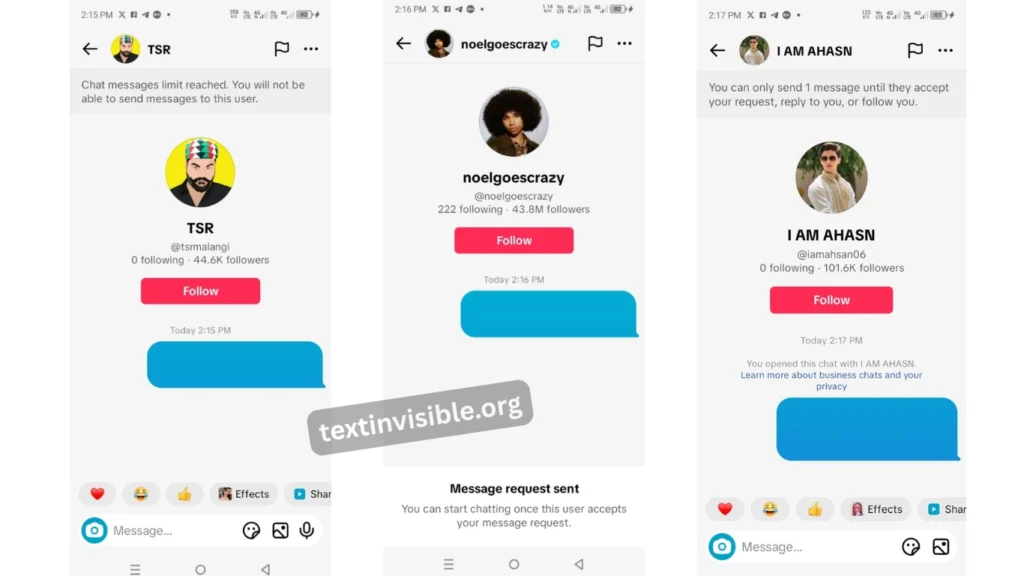
TikTok blank comment don’t work because of limits or privacy rules. TikTok may delete your comment or block you from commenting for a while. But you can still use them in TikTok messages it works there without any problem. If you want to post a blank comment on TikTok, you need to read this article.
4. Empty Text for IG Bios or Usernames
Instagram is one of the most fun platforms and helps attract people to your profile. It can also help you get more followers and improve your profile’s visibility. This is one of the best ways to grow your Instagram account. You can also use invisible text to post empty captions or comments.

5. Invisible Text on Youtube
YouTube is another platform where you can make fun, but on YouTube, the comment that gets the most likes usually appears at the top. You should try commenting on the latest videos. When new visitors see your comment, they might get surprised and like it. If your comment gets more likes, it can appear at the top.
This method works well, commenting on trending content can help give your comment more exposure. If you comment on a new video (like one posted just 10 minutes ago), there’s a good chance your comment will be shown at the top. This can bring people to your channel and increase your views.
Invisible typing text can also be a useful tool if you use it in this way.

Empty Text on Gaming Profiles
Empty text is also a good tool for gaming. You can use it for many fun purposes. This tool is made for entertainment, and you can use it anywhere to create fun moments. After social media, gaming is the best place to use it. You can easily prank your teammates, and they might fall for it. It’s a fun way to make your gaming experience more exciting.
Blank Name for Gaming / PUBG / Free Fire
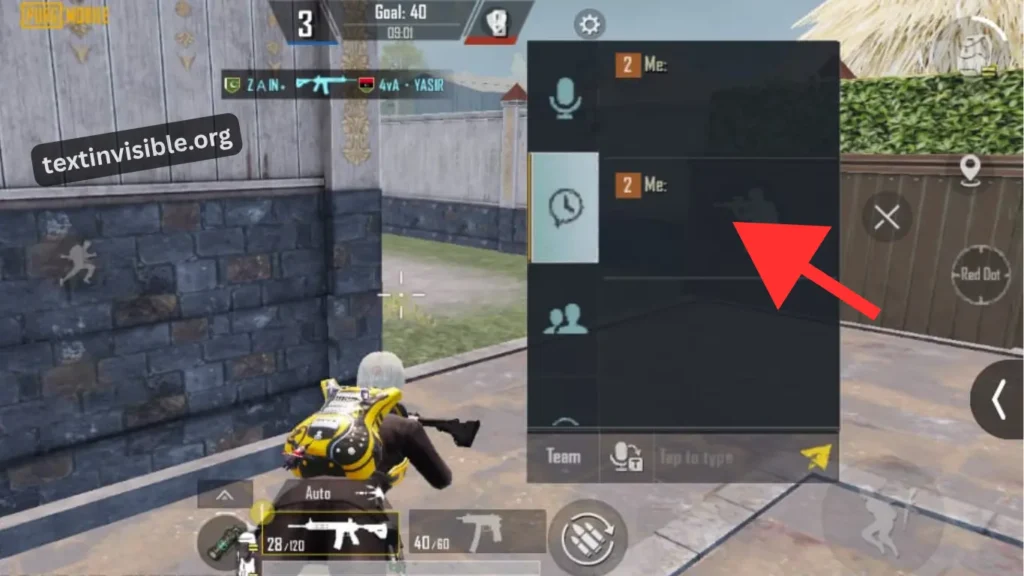
These days, there are many voice packs available, but nothing feels unique. You can prank your teammates using Invisible text typing. When they ask what you sent, just say, “I sent a message, maybe upgrade your PUBG or Free Fire.”
This way, you can start a fun prank and make your gameplay more exciting.
Invisible Text for Steam
If your friends are on Steam and you want to try something new, you can use invisible text in the forum or community. It will make your comment stand out. You can also make your name look invisible so no one knows who you are. It’s a fun way to hide your identity and prank others. But keep in mind, your real username will still be the same.

Benefits of Using Invisible Characters
In today’s world, staying anonymous is very useful. Invisible or empty text is a perfect example of this. You can create empty names to avoid being found by search algorithms. You can also make a stylish bio using invisible characters and grab attention on social media. This helps make your profile look unique.
Invisible Text vs Fancy Text
Invisible Text
Fancy Text
Frequently Asked Questions
Conclusion
In this article, we talk about how to use invisible empty text for fun. We explain how to use it properly and how it can help you get more followers on your social profiles. We also cover which platforms allow invisible characters. TikTok and Reddit don’t allow invisible comments, but you can still use them in messages. We also compare fancy text with invisible characters.


